Friday, 24 March 2023

If-Else statement in Python !!

Python If-else statements

Decision making is the most important aspect of almost all the programming languages. As the name implies, decision making allows us to run a particular block of code for a particular decision. Here, the decisions are made on the validity of the particular conditions. Condition checking is the backbone of decision making.

In python, decision making is performed by the following statements.

StatementDescription
If StatementThe if statement is used to test a specific condition. If the condition is true, a block of code (if-block) will be executed.
If - else StatementThe if-else statement is similar to if statement except the fact that, it also provides the block of the code for the false case of the condition to be checked. If the condition provided in the if statement is false, then the else statement will be executed.
Nested if StatementNested if statements enable us to use if ? else statement inside an outer if statement.

Indentation in Python

For the ease of programming and to achieve simplicity, python doesn't allow the use of parentheses for the block level code. In Python, indentation is used to declare a block. If two statements are at the same indentation level, then they are the part of the same block.

Generally, four spaces are given to indent the statements which are a typical amount of indentation in python.

Indentation is the most used part of the python language since it declares the block of code. All the statements of one block are intended at the same level indentation. We will see how the actual indentation takes place in decision making and other stuff in python.

The if statement

The if statement is used to test a particular condition and if the condition is true, it executes a block of code known as if-block. The condition of if statement can be any valid logical expression which can be either evaluated to true or false.
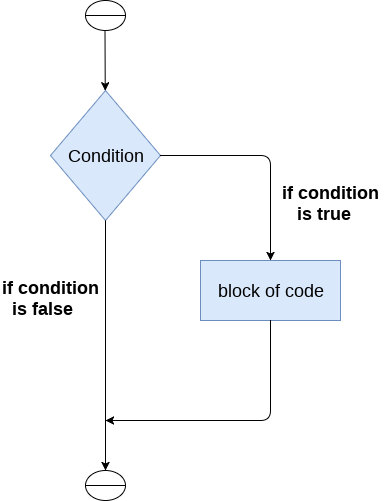
Python If-else statements

The syntax of the if-statement is given below.

  1. if expression:  
  2.     statement  

Example 1

  1. num = int(input("enter the number?"))  
  2. if num%2 == 0:  
  3.     print("Number is even")  

Output:

enter the number?10
Number is even

Example 2 : Program to print the largest of the three numbers.

  1. a = int(input("Enter a? "));  
  2. b = int(input("Enter b? "));  
  3. c = int(input("Enter c? "));  
  4. if a>b and a>c:  
  5.     print("a is largest");  
  6. if b>a and b>c:  
  7.     print("b is largest");  
  8. if c>a and c>b:  
  9.     print("c is largest");  

Output:

Enter a? 100
Enter b? 120
Enter c? 130
c is largest

The if-else statement

The if-else statement provides an else block combined with the if statement which is executed in the false case of the condition.

If the condition is true, then the if-block is executed. Otherwise, the else-block is executed.
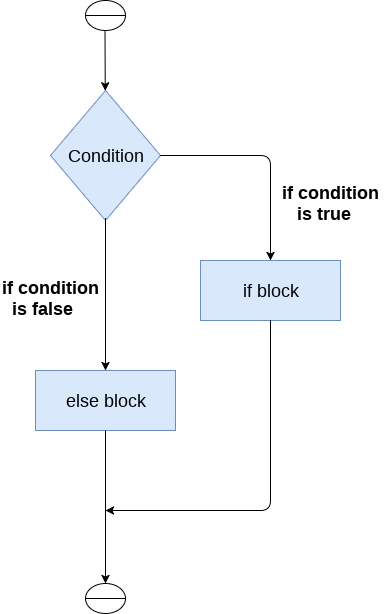
Python If-else statements

The syntax of the if-else statement is given below.

  1. if condition:  
  2.     #block of statements   
  3. else:   
  4.     #another block of statements (else-block)   

Example 1 : Program to check whether a person is eligible to vote or not.

  1. age = int (input("Enter your age? "))  
  2. if age>=18:  
  3.     print("You are eligible to vote !!");  
  4. else:  
  5.     print("Sorry! you have to wait !!");  

Output:

Enter your age? 90
You are eligible to vote !!

Example 2: Program to check whether a number is even or not.

  1. num = int(input("enter the number?"))  
  2. if num%2 == 0:  
  3.     print("Number is even...")  
  4. else:  
  5.     print("Number is odd...")  

Output:

enter the number?10
Number is even

The elif statement

The elif statement enables us to check multiple conditions and execute the specific block of statements depending upon the true condition among them. We can have any number of elif statements in our program depending upon our need. However, using elif is optional.

The elif statement works like an if-else-if ladder statement in C. It must be succeeded by an if statement.

The syntax of the elif statement is given below.
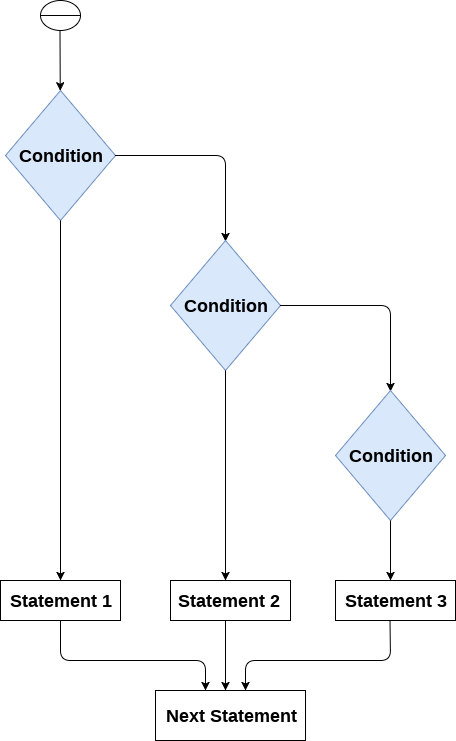
  1. if expression 1:   
  2.     # block of statements   
  3.   
  4. elif expression 2:   
  5.     # block of statements   
  6.   
  7. elif expression 3:   
  8.     # block of statements   
  9.   
  10. else:   
  11.     # block of statements  
Python If-else statements

Example 1

  1. number = int(input("Enter the number?"))  
  2. if number==10:  
  3.     print("number is equals to 10")  
  4. elif number==50:  
  5.     print("number is equal to 50");  
  6. elif number==100:  
  7.     print("number is equal to 100");  
  8. else:  
  9.     print("number is not equal to 10, 50 or 100");  

Output:

Enter the number?15
number is not equal to 10, 50 or 100
Example 2

  1. marks = int(input("Enter the marks? "))  
  2. f marks > 85 and marks <= 100:  
  3.    print("Congrats ! you scored grade A ...")  
  4. lif marks > 60 and marks <= 85:  
  5.    print("You scored grade B + ...")  
  6. lif marks > 40 and marks <= 60:  
  7.    print("You scored grade B ...")  
  8. lif (marks > 30 and marks <= 40):  
  9.    print("You scored grade C ...")  
  10. lse:  
  11.    print("Sorry you are fail ?")  

  12. Example two of if-elif-else condition

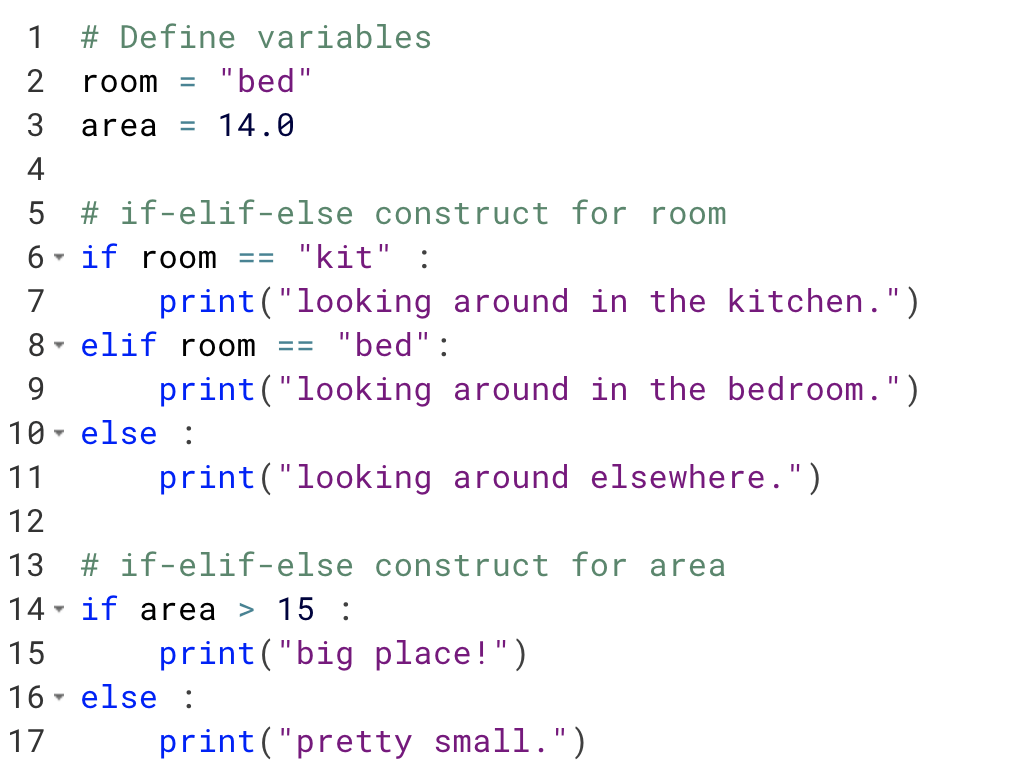
    In the below example, you define two variables room and area. You then construct if-elif-else and if-else conditions each for room and area, respectively.

    In the first condition, you check if you are looking in the kitchen, elif you are looking in the bedroom, else you are looking around elsewhere. Depending on the value of the room variable, the satisfied condition is executed.

    Similarly, for the area variable, you write an if and else condition and check whether the area is greater than 15 or not.

    example of if-elif-else condition 2

Thursday, 23 February 2023

Creating a simple AI program in R programming !

Sure! Here's a simple AI program in R programming that uses a decision tree algorithm to predict whether a person is likely to buy a car based on their age and income.

First, let's create a dataset that contains information about people's age, income, and whether they bought a car or not.

R
# Create dataset age <- c(25, 35, 45, 55, 65, 75) income <- c(20000, 30000, 40000, 50000, 60000, 70000) bought_car <- c(0, 0, 1, 1, 1, 1) df <- data.frame(age, income, bought_car)

Next, let's split the dataset into a training set and a test set.

R
# Split dataset into training and test sets library(caTools) set.seed(123) split <- sample.split(df$bought_car, SplitRatio = 0.7) training_set <- subset(df, split == TRUE) test_set <- subset(df, split == FALSE)

Now, let's train a decision tree model on the training set.

R
# Train decision tree model library(rpart) model <- rpart(bought_car ~ age + income, data = training_set, method = "class")

Finally, let's use the model to make predictions on the test set.

R
# Make predictions on test set predictions <- predict(model, test_set, type = "class")

And that's it! Here's the complete code:

Rde
# Create dataset age <- c(25, 35, 45, 55, 65, 75) income <- c(20000, 30000, 40000, 50000, 60000, 70000) bought_car <- c(0, 0, 1, 1, 1, 1) df <- data.frame(age, income, bought_car) # Split dataset into training and test sets library(caTools) set.seed(123) split <- sample.split(df$bought_car, SplitRatio = 0.7) training_set <- subset(df, split == TRUE) test_set <- subset(df, split == FALSE) # Train decision tree model library(rpart) model <- rpart(bought_car ~ age + income, data = training_set, method = "class") # Make predictions on test set predictions <- predict(model, test_set, type = "class")